![PocketLab Logo Tagline LeftAlign SM.png]](https://support.thepocketlab.com/hs-fs/hubfs/PocketLab%20Logo%20Tagline%20LeftAlign%20SM.png?height=40&name=PocketLab%20Logo%20Tagline%20LeftAlign%20SM.png)
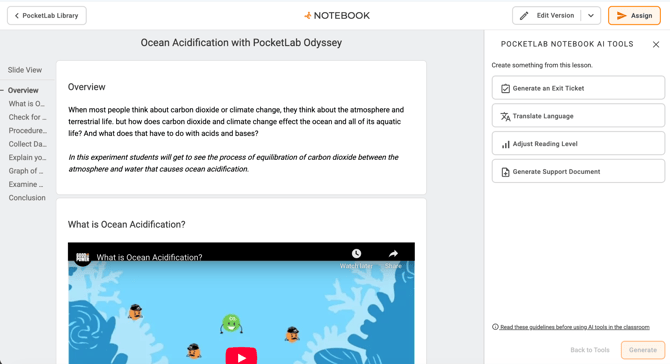
AI Tools Are Easier to Find and Use
AI tools for teachers are now located in a dedicated side panel in curriculum lessons. Open the tools using the floating action button when no card is selected.
Previously, these tools were accessed through the Version dropdown. They haven’t changed—but they’re now much easier to find and use without interrupting your workflow.
What’s improved:
- You can stay in your current lesson while using AI tools
- AI-generated content now appears in real time in the side panel
- You can preview changes as they’re created, instead of waiting on a loading screen
- It’s easier to compare your original lesson with the new version
This is especially helpful for tasks like translating a lesson or adjusting reading level, where reviewing changes is important before using them with students.
A More Consistent Look and Feel
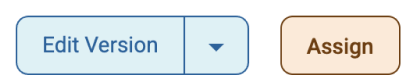
We’ve updated buttons and interactions across PocketLab Notebook to make the experience clearer and more consistent.
What you’ll notice:
- Primary actions (like assigning or continuing) are easier to identify
- Secondary actions are less visually prominent
- Step-based actions (like onboarding) are more clearly guided
These updates are designed to make it easier to know what to do next, especially during multi-step tasks.
Old Style
New Style

Exit Tickets Now Create Ready-to-Use Questions
AI-generated Exit Tickets now create fully built question cards instead of a single block of text.
Each question includes:
- A clear prompt
- Answer choices (for multiple choice)
- The correct answer
- Teacher notes
Questions are designed using Bloom’s Taxonomy, helping you assess both basic understanding and higher-level thinking.
This means less time editing and formatting—and more time using the questions with your students.